


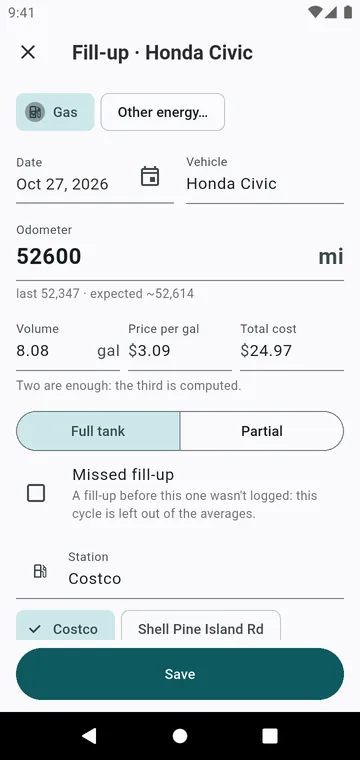
A fill-up in a few seconds
Fill-up asks for the Odometer, the Volume, the price and the total: two of the three are enough, the third is computed. Full tank or Partial: a partial fill-up is added to the next full one. The Station is remembered, and a receipt photo can be added.
Consumption between full tanks
Consumption is worked out from one full tank to the next, in mpg (US), mpg (UK), L/100 km or km/L. Each average says its period, such as this year or since you started. When a fill-up was not logged, tick Missed fill-up: that cycle is left out of the averages. And when a consumption looks wrong, the app asks whether you missed one.
Electric and plug-in hybrid
A Charge is entered in kWh, or as Battery before (%) and Battery after (%) once the battery capacity is set. Consumption is shown in mi/kWh, kWh/100 km or km/kWh. A plug-in hybrid keeps two consumptions that never mix.
Two fuels in one car
Flex (ethanol and gas), CNG + gas, LPG + gas: each fill-up says which fuel went in. On a flex car, type the price at the pump and the app tells you whether ethanol pays off against your last gas price. See Ethanol or gas.